


Can you challenge a penalty proposed in a CP2000 notice? Yes. You can contest a proposed penalty and appeal a determination, but you must request that review. The IRS usually gives you 30 days from the notice date to respond, so how to respond to IRS letter CP2000 begins with reviewing the proposed changes and noting the deadline.
A CP2000 can feel like a bill, but it’s a proposed change, not a final amount due. Your response can agree with the changes, dispute some or all of them, or take a different position on separate items. A focused explanation and relevant documents help present your position clearly.
This guide explains how to respond to IRS letter CP2000 by organizing your response, deciding whether an amended return may be appropriate, and stating a clear conclusion. You’ll also learn what to include in a response letter, so you can make informed decisions about the next steps.
Key Takeaways
- Separate the proposed adjustments you accept from those you dispute, and support disputed items with relevant records.
- Determine whether a separate amended return is needed based on whether you have other income, credits, or expenses to report.
- Organize your response around a clear proposed conclusion, the notice details, and documents that substantiate your position.
- Learn when professional IRS representation and tax resolution support may help you manage a complex response.
Agreeing or disagreeing with proposed changes
Compare each proposed adjustment with your records before deciding whether to agree or disagree. Address each item clearly rather than treating the notice as an all-or-nothing decision.
-
Choose Whether to Agree, Partially Agree, or Disagree
Review every adjustment in the CP2000 notice against the tax return and supporting records. The notice is computer-generated and may be incorrect, so don’t assume its proposed tax calculation is final. An income item may be missing, reported under the wrong category, or already included on your return. Identify the specific difference before deciding how to respond.
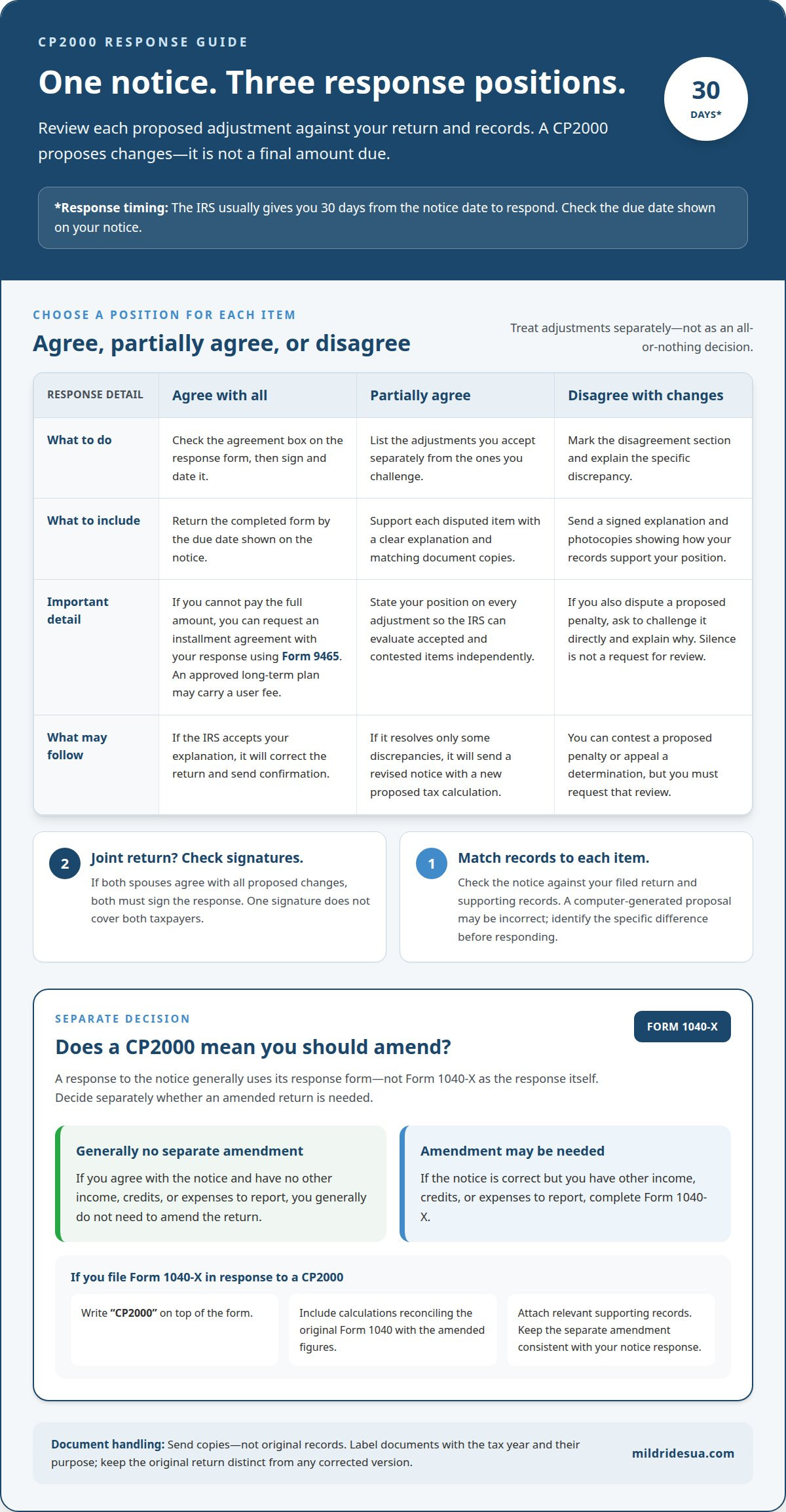
If every change is correct, check the agreement box on the response form, then sign and date it. Return the form by the due date shown on the notice. If you disagree with any change, mark the disagreement section and include a signed explanation with photocopies of supporting documents. Explain the discrepancy and show how your records support your position.
You can agree with some proposed changes while disputing others. For example, accept an adjustment that correctly adds omitted income, but dispute another that overlooks documented basis. State each position separately so the IRS can evaluate accepted and contested items. If the IRS accepts your explanation, it will correct the return and send confirmation. If it resolves only some discrepancies, it will send a revised notice with a new proposed tax calculation.
A CP2000 response also gives you a way to contest proposed penalties or appeal a determination, but you must ask to do so. Don’t treat silence about a penalty as a request to challenge it. If you dispute a proposed penalty, identify it directly and explain why the facts or records support your position. A clear response addresses the adjustment, the reason for your position, and the documents that substantiate it.
-
Separate Agreed and Disputed Adjustments
List each adjustment you accept separately from each one you challenge. Match your explanation and supporting photocopies to the disputed item, rather than sending a general disagreement that leaves the IRS to infer your position. For a joint return where both spouses agree with all proposed changes, both must sign the response. Don’t assume one signature covers both taxpayers.
-
Consider Payment and Installment Options
If you agree with all proposed changes but can’t pay the full amount, you can request an installment agreement with your response. Taxpayers agreeing with all changes can request one using IRS Form 9465. A long-term payment plan may carry a user fee if approved. Keep the payment request distinct from any disagreement, and don’t treat a payment arrangement as evidence that disputed adjustments are correct.
Do I need to file an amended return for a CP2000?
Compare the CP2000 proposal with your filed return before deciding whether to amend it. Interest generally runs from the original return’s due date through 30 days after the notice date, and penalties may apply.
-
Compare IRS Income Records With Your Return
Review the income items in the CP2000 against your Form 1040 and supporting records. Match each reported amount with the relevant W-2, 1099, or other income document, and look for duplicate reporting or missing basis. IRS wage and income transcripts may not include every Form W-2 and 1099 until late May, so consider whether a transcript is complete for the tax year.
Distinguish an IRS reporting mismatch from an error on your return. If a payer issued a corrected form, determine whether that change explains the proposed amount. If your original return omitted income or reported an incorrect amount, identify the affected entry and keep documents showing the correction. This review helps clarify whether the notice reflects a record mismatch or an error on the return.
-
Attach Original and Corrected Returns
Keep the return filed with the IRS distinct from any corrected version you prepare. A response to a CP2000 generally uses the notice’s response form, not Form 1040-X as the response itself. If you prepare a corrected calculation to explain your position, attach a copy of the original return and the corrected return showing the proposed corrected liability.
Label each document clearly with the tax year and its purpose. The original return shows what you filed; a corrected version shows how the figures change. This distinction helps the IRS follow your calculation instead of treating a supporting document as a replacement response. Send copies with your response, not original records.
- Decide whether the corrected figures require a separate amended return. According to the Internal Revenue Service, if a CP2000 notice is correct but you have other income, credits, or expenses to report, complete Form 1040-X, Amended U.S. Individual Income Tax Return. If you agree with the notice and have no other income, credits, or expenses to report, you generally don’t need to amend the return.
When filing Form 1040-X in response to a CP2000, write “CP2000” on top of the form. Include calculations that reconcile the original Form 1040 with the amended figures, and attach the relevant supporting records. Don’t submit an amended return as a substitute for answering the notice. Keep the response and any separate amended filing consistent.
- Use the reconciliation to correct records for future returns. For example, if a corrected 1099 changes reported income, retain it with the tax-year records and use the accurate amount when preparing a later return. If the discrepancy came from how a transaction was reported, document the underlying figures and treatment. This makes it easier to distinguish a new reporting issue from an old CP2000 adjustment.
The IRS generally calculates interest on an unpaid balance from the original return’s due date, regardless of extensions, through 30 days after the notice date. A 20% accuracy penalty may apply to additional tax proposed in a CP2000 notice. The final calculation depends on the adjustment and payment history, so review the notice’s proposed tax, interest, and penalty separately.
How much time do I have to respond to an IRS CP2000?
According to the Internal Revenue Service, taxpayers usually have 30 days from the notice date to respond. Compare the notice with your tax records promptly, then follow its response instructions and deadlines.
To verify a CP2000 notice, review its tax year, notice date, and AUR control number, then verify it through official IRS contact channels. If you missed a deadline, act promptly: the IRS may issue a 90-day letter, also called CP3219A, after an appeal deadline passes.
- Understand why the IRS sent the notice. A CP2000 can follow when third-party income or payment information does not match what you reported on your return. For example, a payer’s Form 1099 may show income that isn’t listed on your Form 1040, or an amount may appear different because records don’t align.
Compare each proposed adjustment with the relevant tax return, Forms W-2 or 1099, and your own records. Check the tax year, payer name, reported income, withholding, and credits. IRS wage and income transcripts can help identify reported items, but they may not include every Form W-2 and 1099 until late May.
- Record identifying details before preparing your response. Note the notice date, tax year, your name, and the AUR control number shown on the CP2000 notice. Match those details with your filed return and supporting documents so the response addresses the correct tax period and proposed changes.
Use the mailing address or fax number printed on your notice. If faxing, put your name, Social Security number, and tax year on every page. Follow the notice’s instructions for digital submission if it offers an upload option, and keep a copy of your complete response.
- Submit your response within the stated window. The Internal Revenue Service usually allows a 30-day extension when you request it before the IRS sends its next notice. Send the extension request using the reply option on your notice, and retain a copy of the request and delivery record.
A CP2000 notice may provide a 30-day period to appeal to the IRS Independent Office of Appeals, according to the Internal Revenue Service. Treat that appeal period as distinct from your initial response deadline, and follow the appeal instructions included with the notice.
- Address a missed deadline without assuming the dispute is over. You may ask to contest penalties or appeal a determination, but you must request that review. If the appeal deadline has passed, respond to later IRS correspondence promptly; the IRS may issue a 90-day letter, CP3219A.
Don’t rely on a general mailing address or fax number found elsewhere. The notice’s response address and submission instructions are specific to your case. If you submit documents digitally, retain the confirmation and the exact files you sent so you can track what the IRS received.
Stating the taxpayer’s proposed conclusion
State the outcome you want the IRS to reach, then connect it to the proposed adjustments, your records, and any payment decision.
-
Review the Proposed Changes
Review each adjustment and the proposed tax calculation before stating your conclusion. Compare the reported income, credits, and deductions with the figures on your filed return. Identify the entries you accept and those you challenge. If one adjustment affects another calculation, explain the connection so your response addresses the combined effect, not just one line.
Check the notice’s tax year and proposed balance. Your conclusion should match the evidence you submit, not simply repeat the amount you would prefer to pay. If a payer’s record is involved, explain how it relates to your return and provide records that support your position.
- Write a direct conclusion near the start of your explanation. For example, say that you agree with the proposed adjustment, disagree with a specified item, or accept some changes while challenging others. Identify the relevant tax year and adjustment so the IRS can connect your request to the correct CP2000 case.
Then summarize your reasoning. If the proposed income amount is wrong, state the amount you believe is correct and point to the supporting records. If you dispute a penalty, name it and explain why your documents or circumstances support removing or changing it. Avoid vague statements such as “the calculation is incorrect” without identifying the disputed entry.
- Keep your conclusion separate from the supporting details. A useful response states the outcome you want, explains why, and identifies the attached evidence. If you disagree with only some changes, address each adjustment separately. This helps the IRS evaluate accepted changes without mistaking them for concessions on disputed items.
If the notice’s calculation is correct but other income, credits, or expenses also need reporting, decide whether a separate amended return is appropriate. Keep that filing consistent with the conclusion in your CP2000 response. Don’t use an amended return as a substitute for answering the notice.
-
Pay or Settle the Proposed Balance
If you accept the proposed balance, decide whether you can pay it in full or need a payment arrangement. Paying the proposed amount within 30 days of the notice date stops additional interest and may stop additional penalties from accruing. If you can’t pay the full balance, you may apply for a payment plan or an offer in compromise.
State your payment position clearly, but separate it from any dispute about the calculation. A payment request doesn’t explain why an adjustment is wrong, and a disagreement doesn’t arrange payment. If you agree with all proposed changes but need installments, you can request an installment agreement with your response.
CP2000 response letter structure
A well-organized CP2000 response helps the IRS underreporter unit connect your position with its proposed adjustment. Arrange the response form, explanation, and supporting documents in a clear sequence.
- Begin with the notice details. Identify the CP2000 notice date, tax year, and AUR control number shown on the notice. Include your name and Social Security number so the response can be associated with the correct taxpayer and case.
If you prepare a separate letter, include the same identifying details. When faxing, put your name, Social Security number, and tax year on every page. These details help keep the pages together when your response includes multiple documents.
- State your conclusion before the supporting explanation. Tell the IRS whether you agree with all proposed changes, disagree with specific adjustments, or accept some and dispute others. Name each disputed item directly, then describe the outcome you want the IRS to reach.
For example, identify a reported income item by its payer or document, explain why the proposed amount is inaccurate, and state the amount or treatment you believe is correct. Avoid a general objection that doesn’t identify the adjustment. A precise conclusion gives the reviewer a clear path through the rest of your response.
- Explain the facts in a short, ordered sequence. Describe what the notice proposes, what your records show, and why those records support your conclusion. Link each explanation to a document, such as a corrected information return or transaction record. If you disagree with only one adjustment, keep that explanation separate from the items you accept.
Include copies of supporting documents, not originals. Organize them so each attachment follows the relevant explanation, and label each page with the tax year and identifying details. A document index can help the reviewer locate evidence when your response includes records for several adjustments.
- Complete the response form and sign your submission. If you agree, use the agreement option; if you disagree, complete the disagreement section and include a signed explanation. For a joint return where both spouses agree with all proposed changes, both must sign.
A sample response may also include a declaration that the statements and accompanying documents are true and correct to the representative’s best knowledge, information, and belief. Sign and date where the form or letter requires. Attach a copy of the CP2000 notice so the case materials remain together.
- Choose a submission method listed on your notice, then keep a complete copy of your response and proof of submission. The IRS accepts responses by mail, fax, or through the digital link included in the notice. Digital document uploads can use JPG, PNG, or PDF files.
For complex adjustments or a response involving several documents, get help with IRS representation to organize the position and supporting records.
Mildrid Esua, CPA, PLLC
Mildrid Esua, CPA, PLLC helps individuals and small businesses assess CP2000 notices and prepare a clear response. When proposed income, tax calculations, or supporting records are complex, IRS representation and tax resolution services can help bring the issues into focus. The work may include organizing relevant documents, reviewing the proposed changes, and clarifying whether your response agrees, disagrees, or takes a position on separate adjustments.
If the notice connects to back taxes or other unresolved tax matters, coordinated tax support can help you consider the response alongside those obligations. The right next step depends on what the notice proposes and what your records support. Contact Mildrid Esua, CPA, PLLC to discuss your CP2000 response.
Turn your response into a stronger plan
A CP2000 response can also clarify where your tax records and reporting process need attention. Once you’ve settled your position, preserve the response and supporting documents with the records for that tax year. Use the issue as a prompt to organize future income statements and transaction details, so similar questions are easier to address when preparing another return.
Understanding how to respond to an IRS letter CP2000 means making a deliberate decision, documenting the reasoning, and keeping your next steps aligned with the records. If the proposed changes involve complicated transactions or unresolved tax matters, informed support can help you assess the response and consider what comes next.
Discuss your CP2000 response with Mildrid Esua, CPA, PLLC and move forward with a clearer plan. A measured next step can help you approach the issue with greater confidence.
Frequently Asked Questions
Can I fight a CP2000 penalty?
Yes, you can contest a proposed penalty and appeal a determination, but you must request that review. Identify the penalty you dispute and explain the facts that support your position. For example, if the proposed adjustment overlooks a corrected payer statement, include a copy and explain how it changes the reported amount. Keep the penalty challenge separate from any disagreement about income or other proposed tax adjustments.
Can I get an extension on a CP2000?
Yes. The Internal Revenue Service usually allows a 30-day extension when you request it before the IRS sends its next notice. Use the reply option described in your notice, and clearly identify the CP2000 and tax year. Keep a copy of your request and any delivery confirmation with your records. An extension request is not a substitute for responding to the notice or following later instructions.
How do I avoid getting another CP2000?
Reduce reporting mismatches by organizing income documents before filing and reconciling them against the return. For example, match each Form W-2 and Form 1099 to the income entries on your Form 1040, and account for corrected forms. Keep transaction records that explain amounts reported by third parties. These steps can help prevent discrepancies, though they can’t control what information payers submit to the IRS.
How do I check if a CP2000 is correct?
Compare each proposed amount with the return you filed and the original records behind it. For a brokerage transaction, for example, compare the proceeds on Form 1099-B with your records of the transaction and its basis. Check whether the income was already included elsewhere on your return. A difference between third-party reporting and your return can have more than one explanation, so assess each item separately.
Why did I get a CP2000 notice?
You likely received one because information reported to the IRS by a third party differs from an amount on your tax return. A payer’s Form 1099 may show income that appears missing, or reported proceeds may not reflect information used on your return. The notice identifies the mismatch the IRS is proposing to change. Review its specific tax year and line items to understand which records may explain the difference.
What is an IRS CP2000 notice and why did I receive it?
A CP2000 is an IRS notice proposing changes to a tax return after reported information doesn’t match third-party records. It isn’t a bill or, by itself, an audit. For instance, a bank or payment platform may report an amount that differs from what appears on your return. The notice outlines the proposed adjustment so you can assess it and tell the IRS whether you agree.
What is the deadline to respond to a CP2000 notice?
Taxpayers usually have 30 days from the date on an IRS CP2000 notice to respond, according to the Internal Revenue Service. Use the specific due date printed on your notice to plan your submission. If you need additional time, request an extension through the response option provided. Keep a copy of what you send and any transmission or mailing record with the notice.
How do I disagree with the income or tax changes listed on a CP2000 notice?
Mark the disagreement option on the response form and explain which proposed item you dispute. Tie each point to relevant records, such as a corrected Form 1099, a payment record, or documents showing a transaction’s basis. If you accept one adjustment but dispute another, make those positions clear separately. Send photocopies rather than original records, and keep a complete copy of your submission for reference.




Leave a Reply
Your email is safe with us.