


North Carolina payroll is more than issuing paychecks: you need to set up the right tax accounts and keep federal and state reporting on track. To learn how to set up payroll for a small business in NC, start by classifying workers, obtaining a federal Employer Identification Number, registering for state withholding and unemployment insurance, and arranging payroll deductions and filings. North Carolina employers must report new hires within 20 days of their start date, according to the North Carolina Department of Health and Human Services.
North Carolina payroll setup can feel complicated because withholding and unemployment insurance have separate account and reporting requirements. A clear process helps you manage both alongside regular pay runs.
This guide covers the steps in order: worker classification, federal and state registrations, withholding, unemployment tax, and payroll reporting. It also explains how to organize North Carolina forms and deadlines so your process stays dependable as your business grows.
Key Takeaways
- Classify each worker based on the working relationship before setting up payroll, since employee and contractor payments are handled differently.
- Organize federal and North Carolina tax registrations so your business can manage withholding and unemployment obligations through the appropriate accounts.
- Use employee withholding details to calculate payroll deductions, then keep payment and tax records organized for reporting.
- Build a recurring calendar for payroll tax filings, new-hire reports, and year-end forms to help prevent missed requirements.
- Bring bookkeeping and payroll support into the process when setup or ongoing tax reporting becomes difficult to manage consistently.
Employee versus independent contractor classification
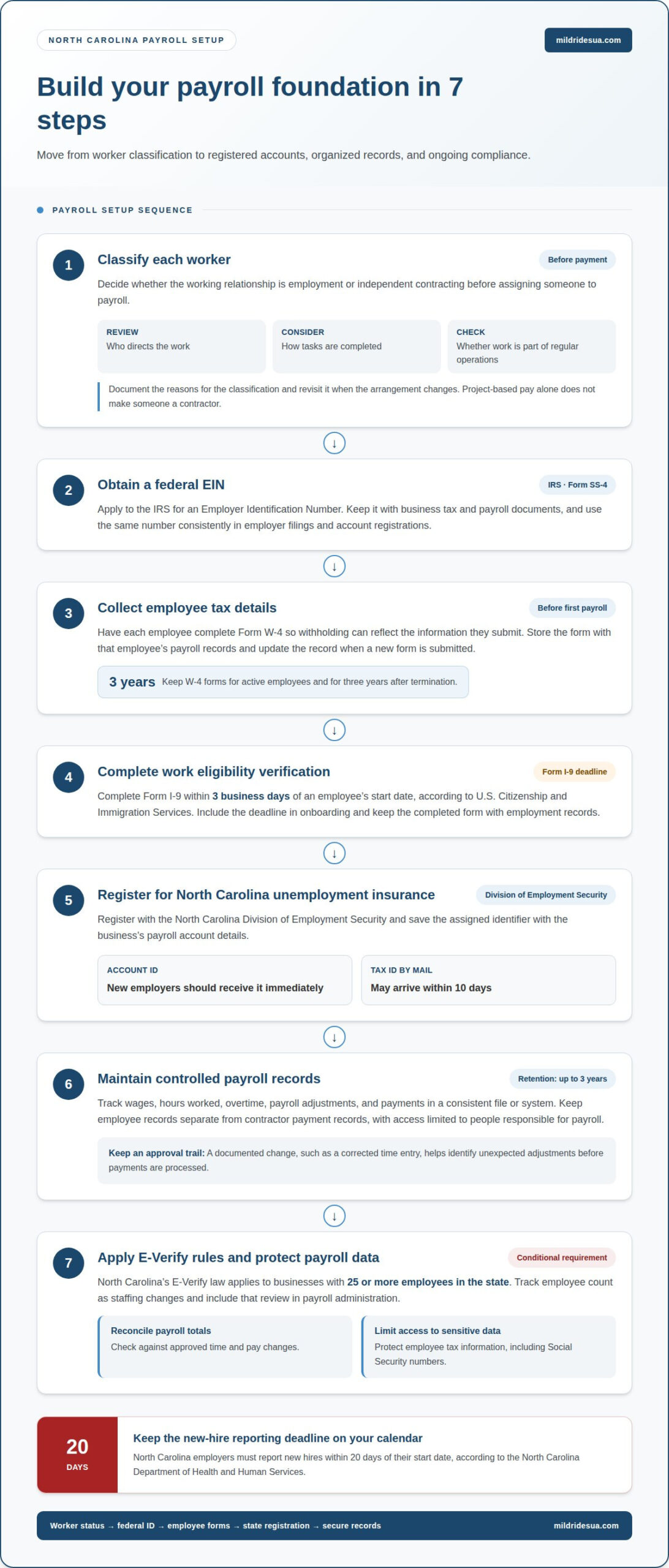
North Carolina employers should keep payroll records showing wages, hours worked, overtime, and other payroll data for up to 3 years. Keep W-4 forms for active employees and for three years after termination, and organize records so each worker’s documents and payments can be traced.
- Classify each worker before processing payments. Decide whether the working relationship is employment or independent contracting before assigning a worker to payroll. Review the actual arrangement, including who directs the work, how tasks are completed, and whether the person works as part of your regular operations. For example, don’t label someone a contractor simply because you pay them by project. Record the reasons for your classification and revisit it when the arrangement changes.
- Obtain an Employer Identification Number. Apply to the IRS for an EIN, also identified as Form SS-4. This federal tax identification number supports employer tax administration and helps distinguish business records from personal financial records. Keep the EIN with the business’s tax and payroll documents, and use the same number consistently in employer filings and account registrations.
- Collect employee tax forms before the first payroll run. Have each employee complete Form W-4 so withholding can reflect their submitted information. Store the form with that employee’s payroll records, rather than mixing it with contractor files. Keep W-4 forms for active employees and for three years after an employee is terminated. Update the payroll record when an employee submits a new form.
- Complete work eligibility verification on time. Employers must complete Form I-9 within three business days of an employee’s start date, according to U.S. Citizenship and Immigration Services. Add the deadline to the onboarding process so the form isn’t overlooked during the first workweek. Keep the completed form organized with employment records, with access limited to staff who handle employee administration.
- Register with the Division of Employment Security. North Carolina employers register with the Division of Employment Security for unemployment insurance. New employers should receive an Account ID immediately or have their Tax ID mailed within 10 days. Record the assigned identifier with the business’s other payroll account details so unemployment tax filings and payments can be connected to the correct employer account.
- Maintain a controlled payroll record system. Track wages, hours, overtime, payroll adjustments, and payments in a consistent file or system. Keep employee records separate from contractor payment records, and limit access to people responsible for payroll. A clear approval trail for changes, such as a corrected time entry, helps identify unexpected adjustments before payments are processed.
- Apply E-Verify rules and security controls appropriately. North Carolina’s E-Verify law applies to businesses with 25 or more employees in the state. Track employee count as staffing changes, and include that review in payroll administration. For fraud prevention, reconcile payroll totals against approved time and pay changes, and protect employee tax information, including Social Security numbers, from unnecessary access.
Federal and state withholding numbers
Set up withholding accounts before your first payroll run, then use each employee’s tax details to calculate deductions. Keep wage calculations, tax deposits, and state filings aligned so every payment has a clear record.
Minimum wage, overtime, and final-paycheck rules are separate from withholding account setup. Tax forms help calculate deductions, but they do not determine wage rates, overtime eligibility, or when final pay is due.
-
Calculate wages and tax withholding
Calculate gross wages from recorded hours, salary arrangements, and approved adjustments before applying withholding. Use each employee’s Form W-4 information for federal income tax and the employee’s North Carolina withholding information for state income tax. Keep the calculation for each pay period with the payroll record. Don’t treat an employee’s take-home pay as the basis for calculating tax.
Include Social Security and Medicare in payroll tax calculations. According to the Internal Revenue Service, employers pay 7.65% of an employee’s wages for their share of these taxes. Show employee deductions and employer tax obligations distinctly in your financial records, so the totals reconcile with payroll payments.
-
Use NC-5 and NC-5P withholding forms
File and pay North Carolina withholding tax through the Department of Revenue eBusiness Center using Form NC-5 or Form NC-5P. Match the form to the filing and payment instructions assigned to your account; don’t assume one form replaces the other. Keep submitted returns and payment confirmations with the corresponding payroll-period records.
Use a recurring calendar to track due dates and the related tax liabilities. Before filing, reconcile withholding totals on the return against payroll records and payments. If your account’s filing frequency changes, follow the current instructions for the new periods and document the transition.
-
Register for a North Carolina withholding account.
Apply to the North Carolina Department of Revenue for a Withholding Tax Account ID. Employers typically receive the Department of Revenue Account ID immediately after applying online; otherwise, the Withholding Tax ID is mailed within 10 days. Save the identifier with your employer tax records and use it consistently for state withholding filings and payments.
Set up eBusiness Center access for authorized staff who manage returns and payments. Keep credentials secure and document who handles each submission. This creates a clear review trail if payroll totals, filed returns, or payment records need to be reconciled.
-
Reconcile withholding before submitting payments.
For each pay period, compare gross wages, employee withholding, employer payroll taxes, and state deposits. Investigate differences before filing instead of carrying unexplained adjustments forward. A consistent reconciliation process can connect payroll reports to account activity and help identify duplicate or missing payments.
Organize withholding records by employee and pay period. Bookkeeping support can help small businesses maintain consistent records when payroll activity becomes difficult to reconcile with tax filings.
State unemployment tax rate and wage limit setup
Avoid using the wrong unemployment tax rate or wage base, overlooking a rate notice, or missing a filing or payment. Keep unemployment insurance calculations separate from employee withholding and other payroll records.
In North Carolina, calculate state unemployment insurance tax using your assigned rate and taxable wage base. Review both during each monthly payroll reconciliation.
-
Set unemployment tax rates and wage base
Enter your assigned North Carolina unemployment insurance tax rate and taxable wage base into payroll. For 2026, North Carolina’s unemployment insurance taxable wage base is $34,200, according to the North Carolina Division of Employment Security. The state’s 2026 unemployment insurance tax rates range from 0.06% to 5.76%.
New employers have a 1.0% unemployment insurance tax rate in 2026. Don’t assume that rate remains applicable as your account’s experience develops. Employers’ rates are usually determined by the employer’s reserve ratio percentage, calculated by multiplying the employer’s 2025 reserve ratio by 0.68. Use the rate assigned to your business when calculating unemployment tax.
-
Set up unemployment insurance tax
Register for unemployment insurance with the North Carolina Division of Employment Security, then record your account details and assigned rate. Configure payroll to track each employee’s wages against the taxable wage base, distinguishing taxable wages from wages above the limit.
Keep unemployment insurance tax separate from employee income-tax withholding and Social Security and Medicare calculations. Unemployment tax is an employer obligation, so do not deduct it from employee pay. For each payroll period, record taxable wages, the rate used, and the resulting liability together.
-
Review unemployment tax rate notices.
When the Division of Employment Security issues a rate notice, update payroll with the rate and period shown. Keep the notice with your account records and note when the new rate takes effect. Do not automatically carry forward an old rate or apply the new one to periods the notice does not cover.
Before the next applicable calculation, compare the notice with the rate stored in payroll. If you need to correct it, document the change and identify the affected payroll records. This review helps keep state unemployment tax separate from withholding and any local tax tracking.
-
Reconcile wages and unemployment tax regularly.
During each monthly review, compare payroll’s taxable wage totals with employee wage records and your Division of Employment Security account information. Apply the wage base to each employee individually, not as one combined business limit. Keep calculation and payment records together for easier reconciliation when filing.
For example, if an employee’s recorded wages pass the $34,200 taxable wage base for 2026, payroll should apply the state rate only according to the taxable-wage calculation. Review rate notices and payroll entries before filing; don’t use withholding totals as a substitute for unemployment tax records.
Federal and state payroll tax reporting
Register for North Carolina withholding tax through the Department of Revenue, then use its eBusiness Center to file and pay. Create a calendar for federal and state payroll obligations, including new-hire reporting.
North Carolina employers report new hires within 20 days of their start date, according to the North Carolina Department of Health and Human Services. Keep that deadline alongside recurring tax filings, rather than treating employee reports as part of a later payroll reconciliation.
-
Register for withholding tax and file payroll taxes
Register with the North Carolina Department of Revenue and create an NCID user ID and password to access the eBusiness Center. Use the assigned filing frequency to determine when withholding returns and payments are due. North Carolina monthly and quarterly withholding payers file Form NC-5; semiweekly filers file Form NC-5Q quarterly.
Keep each submitted return, payment confirmation, and payroll report together by filing period. North Carolina employers file an annual withholding reconciliation on Form NC-3, according to the North Carolina Department of Revenue. Reconcile the yearly totals to the underlying payroll records before submission, and retain a clear record of any corrections.
Federal payroll reporting also belongs on the calendar. Employers are responsible for reporting and paying payroll taxes regardless of the payroll system they use. Payroll tax reports are submitted to the appropriate authorities quarterly or annually, depending on the obligation. Federal unemployment tax applies to the first $7,000 of each employee’s wages per year; its rate starts at 6% and can drop as low as 0.6% when state unemployment taxes are paid on time.
-
Complete new-hire reporting
Report each new employee through North Carolina’s new-hire reporting process and record the submission date with the employee’s onboarding documents. North Carolina requires employers to report new hires within 20 days of their start date, according to the North Carolina Department of Health and Human Services. Add the deadline to the hiring workflow so payroll setup and the separate report move forward together.
Keep a new-hire log with each employee’s start date, report date, and confirmation details. For example, when someone starts during a busy payroll week, the log keeps this separate reporting task visible. Do not assume payroll software automatically submits the state filing. Employers remain responsible for required reports.
-
Reconcile filings against payroll records.
At each filing, compare reported wages and withholding with the payroll register and payment history. North Carolina employers file Form NCUI 101, the Employer’s Quarterly Tax and Wage Report, quarterly. Track that report separately from withholding returns, since the forms cover different payroll obligations.
At year-end, match employee wage statements to payroll totals and complete the state reconciliation. Use a filing calendar that identifies the tax authority, form, filing frequency, and responsible staff member. This helps prevent a quarterly report from being mistaken for an annual filing.
State and federal tax registration
To register as an employer in North Carolina, obtain a federal Employer Identification Number, then register for state withholding and unemployment insurance. Apply for the EIN through the IRS and set up access to the North Carolina Department of Revenue’s eBusiness Center for state tax administration.
- Apply for a federal EIN. Use the IRS EIN application to request an Employer Identification Number, identified with Form SS-4. Federal EIN applications through the IRS are free, and most applicants who apply online receive their number immediately after completing the application. Keep the EIN with your business tax records and use it consistently for employer filings.
The IRS provides criteria to help businesses determine whether they need an EIN. If you are hiring employees, obtain the number before payroll begins so federal employer tax records can be associated with your business. Keep the EIN separate from employee Social Security numbers and limit access to staff handling financial records.
- Register for North Carolina withholding tax. Register with the North Carolina Department of Revenue and create an NCID user ID and password to access its eBusiness Center. This gives you access to state withholding administration. Store account information securely and assign responsibility for maintaining the login and tax correspondence.
North Carolina employers typically receive their Department of Revenue Account ID immediately after applying online. Otherwise, the Withholding Tax ID is mailed within 10 days. Store the identifier alongside your federal EIN, but keep the two numbers clearly labeled. Using the correct account for state withholding helps prevent a return or payment from being associated with the wrong registration.
- Register for state unemployment insurance. Register with the North Carolina Division of Employment Security when setting up as an employer. New North Carolina employers registering with the Division should receive an Account ID immediately or have their Tax ID mailed within 10 days. Keep the account details with other employer tax records, since unemployment insurance has separate registration and reporting needs.
Do not confuse your Division of Employment Security account with your Department of Revenue withholding account. They serve different state tax functions. Record each registration date, assigned account identifier, and related notice so payroll staff can direct filings and payments to the right account.
- Coordinate federal and state employer obligations. Use your EIN for federal employer tax administration, including income-tax withholding and Social Security and Medicare tax records. Use your North Carolina withholding account for state income-tax withholding. Businesses with employees also need to register as employers and for unemployment insurance and workers’ compensation insurance.
Keep registrations aligned with the business’s legal name and tax records. If the business changes its structure or employer details, review the related accounts and payroll records together. For help coordinating payroll setup with tax preparation, get support with small-business payroll taxes.
Mildrid Esua, CPA, PLLC: Tax Planning & Tax Preparation,Bookkeeping IRS Representation small business accounting Tax resolution unfiled tax, tax lien , payroll servies
Mildrid Esua, CPA, PLLC helps small businesses manage payroll services, bookkeeping, and small business accounting. Turn to the firm when you need help coordinating payroll records with tax preparation or managing ongoing filings alongside daily operations.
Tax planning and preparation can connect payroll information with your broader business tax responsibilities. If unresolved tax issues, unfiled returns, or a tax lien complicate payroll administration, the firm’s IRS representation and tax resolution services can help address those concerns.
For coordinated support, contact Mildrid Esua, CPA, PLLC to discuss your payroll and tax needs.
Build a payroll process that can grow with your business
Payroll setup is not a one-time administrative task. As hiring, compensation, and operations change, keep payroll connected to your broader financial decisions. A deliberate approach to setting up payroll for a small business in NC makes the process easier to review and update.
Mildrid Esua, CPA, PLLC serves as an accountant and tax advisor for small businesses, helping owners consider payroll alongside their wider tax responsibilities. If you’re ready to strengthen that ongoing process, contact Mildrid Esua, CPA, PLLC to discuss your business’s payroll and tax needs.
Thoughtful oversight helps payroll support an organized foundation for your business’s next stage of growth.
Frequently Asked Questions
How to handle the local taxes?
Start by separating payroll withholding from other business taxes. North Carolina employers must account for federal obligations and state withholding, then assess other taxes based on tax type and business activity. For example, sales and use tax is separate from employee payroll withholding. If your business collects North Carolina sales and use tax, register with the North Carolina Department of Revenue. Keep each tax account and its filings in separate records.
Who Should Consider DIY Payroll?
DIY payroll may suit an owner with a straightforward workforce, accurate wage records, and time to manage tax calculations and filings consistently. Consider the recurring work, not just payday: employee changes, payroll records, and reporting deadlines all need attention. If payroll questions regularly disrupt financial planning or bookkeeping, an accountant or payroll support can help make the process more manageable.
What steps are required to set up payroll for a small business in North Carolina?
First, determine whether each worker is an employee or contractor, then organize onboarding and payroll records accordingly. Obtain an EIN, register for North Carolina withholding and unemployment insurance, and establish a process for recording wages, deductions, and payments. Before the first payroll, assign responsibility for reviewing calculations and tracking reports. For example, a designated calendar owner can coordinate pay dates with required tax filings.
How do I report new hires and verify employee eligibility in North Carolina?
Use separate onboarding tasks for new-hire reporting and work eligibility documentation. North Carolina requires employers to report new hires within 20 days of their start date, according to the North Carolina Department of Health and Human Services. Employers must complete Form I-9 within three business days of an employee’s start date, according to U.S. Citizenship and Immigration Services. Record completion dates so neither task disappears among routine onboarding documents.
What are North Carolina unemployment insurance tax rates, wage base, and registration requirements?
Register with the North Carolina Division of Employment Security and use the rate assigned to your employer account. For 2026, rates range from 0.06% to 5.76%, and the new-employer rate is 1.0%. For 2026, North Carolina’s unemployment insurance taxable wage base is $34,200, according to the North Carolina Division of Employment Security. Keep the account notice with payroll records and update calculations when the assigned rate changes.
How do federal payroll taxes, deposits, and forms work for small businesses?
Federal payroll administration includes withholding and reporting taxes, even if a business uses a payroll system. Employers pay 7.65% of an employee’s wages for their share of Social Security and Medicare taxes, according to the Internal Revenue Service. Federal unemployment tax applies to the first $7,000 of each employee’s wages per year. Keep payroll totals and payment confirmations organized, then use the applicable reporting schedule and forms for each federal obligation.
How much does small-business payroll software or a payroll service cost?
Costs depend on the software’s features, the number and types of workers, payroll complexity, and the level of service included. No single price fits every small business. For professional payroll or accounting services, pricing depends on the work involved and the support needed. Compare the service’s scope with the payroll tasks you want handled.
Should a small business use payroll software, an accountant, or a payroll service?
Choose support based on the responsibilities you need help managing. Software can assist with payroll processing, while an accountant can connect payroll records with bookkeeping and tax preparation. A payroll service can support ongoing administration. Mildrid Esua, CPA, PLLC provides payroll services, bookkeeping, and small business accounting, making accounting support useful when payroll affects wider tax and financial records. Consider whether you need processing, tax guidance, or coordinated support across these areas.




Leave a Reply
Your email is safe with us.